
Every Stage. Every Detail. No Surprises.
SEO, AEO/GEO, page speed, accessibility, CMS setup and training, analytics, content migration — built into every project as deliverables, not afterthoughts. Here's exactly how.
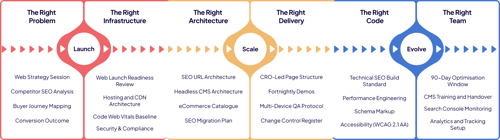
What We Build Into Every Website —Regardless Of Type Or Budget.
Most agencies treat SEO, speed, accessibility, and analytics as extras. We treat them as build deliverables. Here is what is standard across every project we run — and how we keep you informed throughout.
.svg)
WHAT WE HANDLE

WHAT WE NEED FROM YOU
Brand direction, audience context, content and photography, and timely feedback at structured review points. The single biggest driver of on-time delivery is how quickly you respond to design and UAT reviews. We'll tell you exactly when we need decisions and what we need them on — so you can plan for it.
How We Communicate Throughout The Project
One of the most common frustrations teams have is not knowing what’s happening. We prevent that with a consistent communication cadence built into every engagement, so you always know where things stand and what’s next.
Weekly
We + You
Progress update: What's been completed, what's in progress, any decisions or assets needed from you this week.
Per milestone
We + You
Design & UAT reviews: Structured feedback sessions at wireframe, visual design, and staging. Two revision rounds per stage.
At launch
We + You
Go-live readiness review: SEO checklist, speed benchmarks, accessibility audit, analytics verification, redirects, CMS training.
Post-launch
We + You
90-day optimisation: Monthly analytics and AEO/GEO review, conversion analysis, Search Console, iterative improvements.
Built Right From Day One. SEO, Speed, AEO, And Accessibility Included.
Most new sites fail six months after launch — not because the design is wrong, but because SEO foundations were missing, page speed wasn't engineered, and the CMS was built for the developer not the marketing team.
We treat technical SEO, AEO/GEO, Core Web Vitals, WCAG accessibility, and analytics tracking as build deliverables. They're in the scope document, they're in the quote, and they're tested before launch.
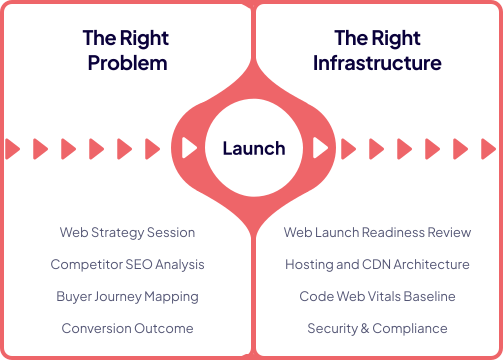
Before platform, before design, before scope — we need to understand your business, your competitive landscape, and your organic search and AI visibility situation. The strategy session produces a platform recommendation, an honest SEO/AEO baseline assessment, a realistic budget, and a plain-English answer on what to build first.
| Who | What |
|---|---|
| We | Audit your current search and AI engine visibility — what queries you own, what competitors own, and what's uncontested |
| We | Recommend the right platform (WordPress, Webflow, or custom) based on your team's capability, growth plans, and content needs |
| We | Identify the content structure, FAQ architecture, and schema markup required for AEO/GEO from day one |
| We + You | Align on target queries, audience segments, conversion goals, and what success looks like in 12 months |
| You | Share any existing analytics, Search Console data, competitor intelligence, and business performance context |
Information architecture is where SEO and AEO are won or lost. The URL structure, page hierarchy, internal linking strategy, and content block design are all established at wireframe stage — before a pixel of visual design begins. Most agencies bolt SEO on after launch. We bake it into the architecture.
| Who | What |
|---|---|
| We | Design URL architecture, navigation taxonomy, and internal linking structure with keyword targeting mapped to every page |
| We | Create wireframes incorporating AEO content blocks: structured FAQ sections, definition panels, and answer-optimised content areas |
| We | Map schema markup requirements (FAQ, HowTo, Article, LocalBusiness, Product) to each page template before design begins |
| We + You | Two wireframe review rounds — you approve UX structure and content strategy before visual design begins |
| You | Confirm priority pages, target keywords by section, and supply any existing content to be incorporated |
Visual design is produced in Figma with WCAG 2.1 AA colour contrast ratios applied from the first mockup — not fixed in a remediation pass after build. Typography sizing, interactive state design, and focus indicator styling are all reviewed for accessibility before development begins.
| Who | What |
|---|---|
| We | Produce high-fidelity Figma designs for all page templates, desktop and mobile, with WCAG 2.1 AA contrast ratios verified throughout |
| We | Design focus states, hover states, and interactive feedback for all interactive elements — keyboard navigation accessibility baked in at design stage |
| We | Apply conversion architecture: CTA hierarchy, social proof placement, trust signals, and urgency elements on every key template |
| We + You | Two design revision rounds in Figma — you approve the design before a single line of code is written |
Development runs on two-week sprints with staging access throughout. Technical SEO, AEO schema, accessibility, and CMS configuration are all implemented during the build — not added afterwards. Every sprint is QA'd against the agreed specification before it moves to the next one.
| Who | What |
|---|---|
| We | Implement all schema markup (FAQ, HowTo, Article, LocalBusiness, BreadcrumbList) in JSON-LD on every applicable page type |
| We | Build structured answer content blocks, FAQ accordions, and definition panels that match AI engine citation preference patterns |
| We | Implement ARIA landmarks, role attributes, alt text standards, and keyboard navigation patterns across all page templates |
| We | Configure the CMS with structured content fields, editorial roles and permissions, and content style guide documentation for your team |
| We + You | Staging access throughout — you can review the build as pages are completed, not just at UAT |
| You | Supply final page copy, photography, and any content that needs to populate the new content blocks |
Page speed is not a final-day optimisation pass. Performance engineering runs throughout development — but a dedicated validation sprint confirms every page template meets our targets before UAT begins. Sub-2s LCP on mobile is a launch requirement, not a stretch goal.
| Who | What |
|---|---|
| We | Run Lighthouse, PageSpeed Insights, and GTmetrix on every primary page template before UAT sign-off |
| We | Audit and remove or defer all render-blocking third-party scripts (chat widgets, marketing tools, analytics) |
| We | Validate Core Web Vitals on real mobile devices — not just emulated — using Chrome UX Report and field data where available |
| We + You | Share Lighthouse and PageSpeed reports before launch — you see the scores, not just a claim |
WCAG 2.1 AA compliance is tested throughout development — not as a single post-build audit. We use a combination of automated tools and manual testing with real screen readers so compliance is verifiable, not just claimed.
| Who | What |
|---|---|
| We | Run automated accessibility audits using axe and WAVE on every page template — catching contrast failures, missing labels, and structure issues at sprint level |
| We | Conduct manual keyboard navigation testing across all interactive elements: forms, modals, dropdowns, accordions, and carousels |
| We | Test with NVDA (Windows) and VoiceOver (macOS/iOS) to verify screen reader experience on all primary page types |
| We | Produce an accessibility audit report before launch — documenting compliance status and any accepted exceptions with rationale |
| We + You | Review audit report before launch sign-off — if government procurement requires a formal WCAG statement, we provide documentation to support it |
Analytics configuration and CMS training are structured deliverables — not afterthoughts squeezed into the final hour before go-live. Your team needs to be able to update the site and read the data before the handover happens, not after.
| Who | What |
|---|---|
| We | Configure GA4 with all conversion events (form submissions, phone clicks, purchases, scroll depth) and custom dimensions relevant to your business |
| We | Set up Google Tag Manager with all tracking tags, triggers, and variables — documented so your marketing team can add future tags without a developer |
| We | Connect Google Search Console, submit XML sitemap, and verify all pages are indexable before launch |
| We | Run a recorded CMS training session for your content and marketing team — covering page editing, media management, SEO fields, and content block usage |
| We | Set up role-based CMS permissions: editors can update content, but can't accidentally break layout or delete structural elements |
| We + You | UAT sign-off checklist: every page template, form, integration, analytics event, and AEO schema block verified before launch approval |
| You | Complete CMS training, confirm analytics look correct, and give written sign-off before go-live is approved |
The 90-day window is where most websites actually improve. We don't disappear at launch. Three monthly reviews cover AEO/GEO citation tracking, Google ranking movement, conversion funnel analysis, and iterative improvements based on real user behaviour — included in every project.The 90-day window is where most websites actually improve. We don't disappear at launch. Three monthly reviews cover AEO/GEO citation tracking, Google ranking movement, conversion funnel analysis, and iterative improvements based on real user behaviour — included in every project.
| Who | What |
|---|---|
| We | Monitor Google Search Console for ranking movement, crawl errors, Core Web Vitals field data, and manual actions across the 90-day window |
| We | Track AI engine citations for your target queries monthly — ChatGPT Browse, Perplexity, Google SGE — and map citation growth to content and schema changes |
| We | Analyse GA4 conversion funnel data — entry pages, drop-off points, goal completion rates — and identify the highest-impact improvements each month |
| We | Implement iterative fixes based on data: copy adjustments, CTA repositioning, schema additions, and content block improvements |
| We + You | Monthly review call — we present findings and data; you decide what to prioritise from the recommended improvements |
Typical New Website Timeline
Book Your Free Strategy Session
Platform recommendation, SEO/AEO baseline, realistic budget, and honest advice. 60 minutes, free, no obligation.
Audit First. Migrate Safely. Fix What's Actually Wrong.
Ranking drops during a rebuild are caused by missing redirects and broken content migration — not redesigns. Speed problems are caused by skipped performance engineering. AI engines not citing you is caused by missing schema. All of these are preventable with the right process.
We start with a full audit — technical SEO, AEO/GEO visibility, Core Web Vitals, accessibility, content quality, and CMS maintainability — before we recommend fix, migrate, or rebuild.
Before we recommend anything, we look at everything. Technical SEO, AEO/GEO visibility, Core Web Vitals, accessibility, content quality, CMS maintainability — all assessed in a single audit report before we make a single recommendation.
| Who | What |
|---|---|
| We | Audit technical SEO: crawlability, indexation, URL structure, canonical issues, duplicate content, missing or malformed schema, and metadata quality |
| We | Run an AEO/GEO gap analysis — check which of your target queries return AI citations for competitors but not for you, and why |
| We | Measure Core Web Vitals on real devices using Chrome UX Report, PageSpeed Insights, and GTmetrix across primary page types |
| We | Run an automated WCAG 2.1 scan using axe — identifying the highest-severity accessibility failures across the current site |
| We | Assess CMS maintainability: can your marketing team update it without a developer? What breaks if they try? |
| We | Deliver a verdict: targeted fix, migrate platform, or rebuild — with honest reasoning and a cost estimate for each option |
| You | Provide Google Analytics, Search Console access, and context on what specific business outcomes aren't happening |
Ranking drops during rebuilds are caused by missing redirects — not redesigns. Every rebuild includes a complete SEO migration plan produced before development begins. Nothing changes on the live site until the plan is approved and tested on staging.
| Who | What |
|---|---|
| We | Crawl the existing site and document every URL, ranking position, title, meta description, H1, and inbound link count before any change is made |
| We | Produce a 301 redirect map for every URL being changed, consolidated, or removed — tested on staging before go-live |
| We | Transfer all metadata to the new platform and improve it where the audit identified gaps or keyword misalignment |
| We | Rebuild and expand schema markup on the new site — including the AEO schema types the old site was missing |
| We | Monitor Search Console for 90 days post-launch, catching crawl errors and ranking changes before they compound into a traffic problem |
| We + You | Review and approve the redirect map and metadata transfer plan before any development begins |
Content migration is where most rebuilds go wrong. Unstructured bulk exports, missing images, broken internal links, and content that doesn't fit the new CMS structure are the most common causes of post-launch chaos. We migrate content into structured content fields — not raw HTML dumps.
| Who | What |
|---|---|
| We | Audit all existing content: what to keep, what to update, what to consolidate or retire — with SEO impact mapped for each decision |
| We | Design CMS content models that match the new content structure — so migrated content populates the right fields, not a single blob of HTML |
| We | Migrate all approved content into the new CMS with structured fields, images re-optimised and re-uploaded to CDN, and internal links updated to new URLs |
| We | Add AEO content blocks (FAQ sections, structured answer panels, entity links) where the old site had none |
| We + You | Content migration checklist reviewed before go-live — every migrated page spot-checked for accuracy and formatting |
| You | Confirm which content to keep, update, or retire, and supply any new or updated copy for pages being refreshed |
A rebuild that doesn't fix the performance, AEO, and accessibility problems identified in the audit is a redesign, not a rebuild. We address all three systematically during development — not in a rushed pre-launch sprint.
| Who | What |
|---|---|
| We | Engineer every page template for sub-2s LCP on mobile — image CDN, code splitting, critical CSS, and font optimisation applied as standard |
| We | Implement the full AEO schema set identified in the audit gap analysis: FAQ, HowTo, Article, BreadcrumbList, and entity markup as appropriate per page type |
| We | Remediate all WCAG 2.1 AA failures identified in the audit: contrast ratios, missing labels, keyboard navigation gaps, and screen reader compatibility |
| We | Produce a post-remediation accessibility report confirming AA compliance — suitable for procurement documentation if required |
| We + You | Share Lighthouse, PageSpeed, and axe reports before UAT sign-off — not claims, actual scores |
A rebuild launch is higher-stakes than a new site launch — you have existing rankings to protect and a team that needs to know how to use the new CMS from day one. Both are structured deliverables, not last-minute tasks.
| Who | What |
|---|---|
| We | Run a recorded CMS training session covering the new content model, editorial workflow, SEO field usage, and media management |
| We | Configure GA4 events, GTM tags, and Search Console — verifying all tracking carries over from the old site without data gaps |
| We | Execute a staged cutover: DNS changes monitored, redirects verified live, Search Console re-submitted, and a confirmed rollback plan in place |
| We | Run a 48-hour post-launch crawl check — confirming all redirects are resolving, no 404s, and no indexation surprises |
| We + You | Post-launch ranking check at 30 and 60 days — verifying rankings are stable and investigating any unexpected movement |
Get A Free Site Audit
Technical SEO, AEO/GEO gaps, Core Web Vitals, accessibility, and CMS health — all assessed before we recommend a single dollar of work.
Product Data Migrated Safely. Conversion Tracked From Day One.
eCommerce builds have three additional complexity layers that standard website builds don't: product data migration, payment gateway integration, and eCommerce-specific analytics. Each one is a common failure point.
We treat product data migration, GA4 eCommerce tracking, and platform-specific performance engineering as core deliverables — scoped, quoted, and signed off before development begins.
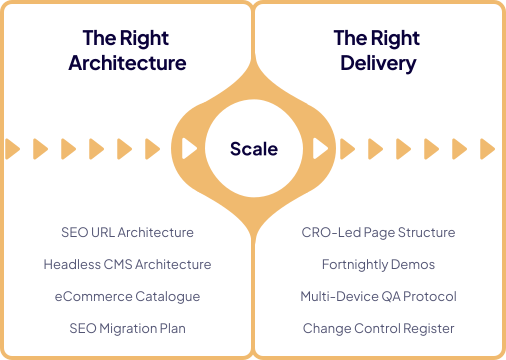
The strategy session for an eCommerce project covers more than platform choice. We assess your existing product data quality, identify migration risks, scope your integration requirements, and map out the AEO opportunities for product and category pages — before any quote is produced.
| Who | What |
|---|---|
| We | Audit your existing product data — quality, completeness, image standards, and SEO metadata — before scoping the migration |
| We | Recommend the right platform with clear reasoning based on catalogue complexity, B2B/B2C model, and integration requirements |
| We | Map your integration requirements: ERP (Cin7, Unleashed, DEAR), accounting (Xero, MYOB), logistics, and marketing (Klaviyo, Mailchimp) |
| We + You | Agree on product data migration scope: which products, variants, images, customer data, and order history to migrate |
Product data migration is one of the most consistently underscoped parts of an eCommerce project. Images arrive at wrong sizes. Metadata gets lost. Variant structures don't map cleanly. Category URLs change without redirects. We scope this explicitly and execute it systematically.
| Who | What |
|---|---|
| We | Export, clean, and restructure product data from the existing platform — removing duplicates, fixing missing fields, and standardising attribute formats |
| We | Re-optimise all product images: compress to WebP/AVIF, standardise dimensions, and upload to CDN — not the new platform's native storage |
| We | Transfer all existing product SEO metadata (titles, descriptions, alt text) and improve where the audit identified gaps |
| We | Map and implement 301 redirects from all old product, category, and tag URLs to the new URL structure |
| We | Implement Product schema, Review schema, Offer schema, and BreadcrumbList on every product and category template |
| We + You | Product migration review — you spot-check a sample of migrated products before the full dataset goes live |
| You | Confirm product data hierarchy, variant naming conventions, and any products being discontinued or merged during the migration |
70%+ of eCommerce traffic arrives on mobile — and most stores lose the majority of their revenue in the mobile checkout flow. We engineer the checkout experience for mobile-first, Lighthouse 90+, and WCAG accessibility from the first template build.
| Who | What |
|---|---|
| We | Build all product, collection, cart, and checkout templates with mobile-first performance: sub-2s LCP, image CDN, and minimal JavaScript in the checkout path |
| We | Design and implement checkout friction reduction: autofill, address validation, one-page checkout (where platform supports), and clear error messaging |
| We | Configure all payment gateways: Stripe, PayPal, Afterpay, Zip, Laybuy, and card-on-file for repeat customers |
| We | Set up and test all integrations: ERP, inventory management, accounting, and email marketing — tested end-to-end on staging before go-live |
| We | Apply WCAG 2.1 AA to the full checkout flow — including form labels, error identification, keyboard navigation, and focus management |
| We + You | Place test orders across every payment method on staging — you verify the full purchase flow before launch is approved |
GA4 eCommerce tracking covers the full purchase funnel — product views, add-to-cart, checkout steps, purchase, and refunds — all verified working before the first real customer arrives. CMS training for an eCommerce store covers more ground than a standard website: product management, collections, promotions, and discount rules.
| Who | What |
|---|---|
| We | Configure the full GA4 eCommerce event set via GTM — verified by running test transactions and confirming events fire correctly in GA4 DebugView |
| We | Set up abandoned cart tracking, email trigger events, and marketing platform integration (Klaviyo, Mailchimp) for post-purchase and winback flows |
| We | Run recorded CMS training covering: product creation and editing, collection management, discount and promotion setup, and inventory management |
| We | Produce a store operations guide: how to add a product, create a sale, manage inventory alerts, and process a refund — in plain language, no developer required |
| We + You | Pre-launch checklist: every payment gateway tested, every email trigger verified, every analytics event confirmed, every redirect working |
Book Your Free Strategy Session
Shopify, WooCommerce, or headless — definitive recommendation in 60 minutes. Data migration scope and cost estimate included.
Content Modelled Properly. Performance And AEO From The Edge.
Headless CMS builds require a different content strategy — structured content fields, content modelling, editorial workflows, and preview environments. The CMS is no longer an afterthought; it's an architectural decision that determines how your content team works every day.
AEO/GEO is also more powerful in a headless architecture — structured content fields map directly to schema markup, and edge-rendered pages achieve the speed scores that correlate with AI engine citation preference.
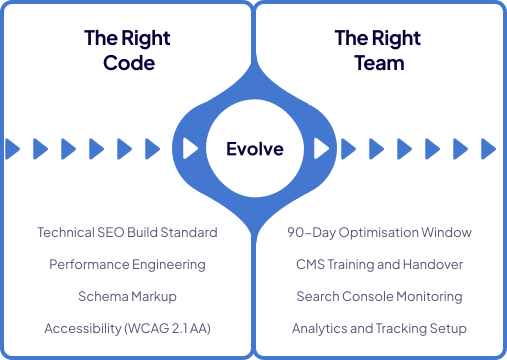
Headless builds start with two workshops most agencies skip: a solutions architecture review that determines the tech stack, and a content modelling session that determines how your editorial team will work every day. Getting content modelling wrong means rebuilding the CMS six months after launch — a very common and very expensive mistake.
| Who | What |
|---|---|
| We | Recommend headless CMS (Sanity, Contentful, or Strapi) and frontend framework (Next.js or Astro) based on your content team size, editorial workflow, and performance requirements |
| We | Run a content modelling workshop: define content types, field structures, relationships, validation rules, and editorial roles for every content type your team will manage |
| We | Design AEO content fields into every content model — FAQ entries, structured answer blocks, entity tags, and schema description fields — so schema output is editorially controlled |
| We | Design the multi-locale content architecture if the project requires multi-region or multi-language deployment |
| We + You | Content model sign-off with your editorial lead and technical stakeholders before any CMS configuration or development begins |
| You | Participate in content modelling workshop with your editorial lead — this requires 2–3 hours of your editorial team's time and has the highest ROI of any single session in the project |
In a headless build, the CMS is configured before the frontend is built — so your editorial team can start populating content during development, and so CMS training can happen with real content rather than dummy data. Preview environments let editors see exactly what will publish before they hit publish.
| Who | What |
|---|---|
| We | Configure all content schemas in the chosen CMS with field validation, help text for editors, and field-level documentation built into the CMS interface |
| We | Set up role-based access: editor, author, reviewer, admin — with appropriate permissions at document and field level |
| We | Configure preview environments connected to the staging frontend — editors can click "Preview" and see exactly what the published page will look like before going live |
| We | Set up content versioning and scheduling if required — so editors can queue content for future publication dates |
| We + You | Editorial team walkthrough of the configured CMS — we verify the content model matches what your team actually needs before frontend development locks the structure |
Headless frontend development is where the performance advantage of the architecture is realised — or lost. Static generation, incremental static regeneration, edge caching, and image optimisation pipelines all need to be configured correctly. We target Lighthouse 95+ and sub-1s LCP at edge for headless builds.
| Who | What |
|---|---|
| We | Build Next.js or Astro frontend with appropriate rendering strategy per page type: static, ISR, or server-rendered based on content freshness requirements |
| We | Configure edge CDN deployment (Vercel, Cloudflare Pages, or AWS CloudFront) with cache invalidation hooks from the CMS — so content updates propagate within seconds |
| We | Implement JSON-LD schema output driven by CMS content fields — so schema is editorially controlled, not hardcoded, and scales with your content team |
| We | Run WCAG 2.1 AA testing throughout development using axe, keyboard navigation testing, and NVDA/VoiceOver screen reader testing — not as a post-build audit |
| We | Produce audit-ready accessibility documentation at each milestone — suitable for government procurement if required |
| We + You | Milestone reviews with your technical and editorial stakeholders — working software, not status reports |
Headless CMS training is more involved than standard CMS training — editors need to understand structured content, content relationships, preview environments, and AEO fields. We run separate sessions for different roles: editorial training for content teams, and admin training for whoever manages users and permissions.
| Who | What |
|---|---|
| We | Run recorded editorial training: creating and editing each content type, using the preview environment, scheduling content, and managing media |
| We | Run recorded AEO training: populating FAQ fields, writing schema description copy, using entity tags, and understanding which fields influence AI citations |
| We | Run recorded admin training: managing user roles and permissions, adding new users, and understanding the content publishing workflow |
| We | Produce a written editorial style guide for the CMS: field-by-field guidance on what to put where and why |
| We | Configure GA4 with all relevant events for the content type (article reads, video plays, form submissions, search queries) plus GTM for future tag additions |
| We + You | Editorial team sign-off: your content team confirms they can create, edit, and publish all content types confidently before launch is approved |
Talk To A Solution Architect
Headless CMS recommendation, content modelling approach, AEO strategy, and performance architecture — before you commit to a build approach.
Still Have Questions?
A 60-minute strategy session answers most of them — including a live AEO/GEO check for your target queries and an honest assessment of what your current site is missing. Free, no obligation.
AEO (Answer Engine Optimisation) and GEO (Generative Engine Optimisation) are the practices of structuring your content so it gets cited by AI tools — ChatGPT, Perplexity, Google SGE, and others. When someone asks an AI for the best web design agency in Sydney, or the difference between Shopify and WooCommerce, the answer comes from pages that have been structured correctly with FAQ schema, entity markup, and answer-optimised content blocks. We implement all of this at build time, not as a retrofit. The difference between a site that gets cited by AI engines and one that doesn't is almost entirely structural — not the quality of the writing.
Our targets before launch: LCP under 2 seconds on mobile (under 1.5s on desktop), CLS under 0.1, INP under 200ms, and Lighthouse Performance score 90+ on all primary page templates. For headless edge-rendered builds, we target LCP under 1 second and Lighthouse 95+. We verify using PageSpeed Insights (real field data), Lighthouse (lab data), and GTmetrix. You see the actual reports before launch — not just a claim. We share Lighthouse screenshots in the UAT package so you have documented proof of the scores at go-live.
Standard setup includes: GA4 with all conversion events configured (form submissions, phone clicks, email clicks, file downloads, scroll depth), Google Tag Manager for future tag management without developer involvement, Google Search Console connected and XML sitemap submitted, and Hotjar (or equivalent) heatmap and session recording configured on key page types. For eCommerce we configure the full GA4 eCommerce event set (view_item, add_to_cart, begin_checkout, purchase, refund) with revenue attribution verified by test transactions before launch. Everything is documented so your marketing team understands what's tracked and why.
A headless CMS (like Sanity, Contentful, or Strapi) stores your content separately from how it's displayed — so the same content can power your website, mobile app, digital signage, or any other channel. You probably need one if: you have multiple digital channels that need the same content, you need sub-second global performance via edge CDN, your editorial team is large enough to need real-time collaborative editing, or your content types are complex enough that a traditional page-based CMS is too limiting. Most websites don't need headless — a well-configured WordPress or Webflow setup is the right answer. We'll tell you honestly in the strategy session.
CMS training is always recorded — so new team members can use it 12 months after launch. It covers: creating and editing every page type, managing media, using SEO fields correctly, updating navigation, and any platform-specific tasks (product management for eCommerce, collection management for Shopify, etc.). For headless builds we run separate sessions for editorial roles vs admin roles, plus a specific AEO training segment covering how to populate structured fields for AI citation. We also produce a written CMS reference guide — not a PDF of screenshots, a plain-language walkthrough of the tasks your team will do most often.
WCAG 2.1 AA is our standard across all project types — not just enterprise builds. Accessibility testing runs throughout development using automated tools (axe, WAVE) at every sprint, keyboard navigation testing across all interactive elements, and manual screen reader testing using NVDA on Windows and VoiceOver on macOS and iOS. We produce an accessibility audit report before launch documenting compliance status. For projects requiring government procurement documentation, we provide a formal WCAG 2.1 AA conformance statement with supporting test evidence.
Yes — ranking drops are caused by missing redirects, not redesigns. Every rebuild includes a full SEO migration plan: URL audit with ranking data captured before any change, a 301 redirect map covering every changed URL tested on staging, metadata transfer and improvement, and 90 days of Search Console monitoring post-launch. We've run hundreds of SEO-safe migrations without ranking loss. The key is doing the redirect mapping before development starts — not as a last-day checklist.
The first conversation costs nothing.
A site without SEO, speed, or AEO costs everything.
Whether you're building from scratch, fixing what's broken, launching eCommerce, or planning a headless platform — we start with a free 60-minute strategy session. Platform recommendation, AEO/SEO baseline, realistic budget, and honest advice.
What To Expect
-
1
Share a few details
Complete the form with your contact details and what you need help with. -
2
Book your free discovery call
Once you submit the form, choose a time that suits you for your discovery call. -
3
Privacy comes first
Sign an optional NDA to ensure the highest privacy level and protection of your idea. -
4
Discovery call
We’ll discuss your goals, the support you need and answer your questions. If we’re a good fit, we’ll outline the next steps.
What To Expect
-
1
Share a few details
Complete the form with your contact details and what you need help with. -
2
Book your free discovery call
Once you submit the form, choose a time that suits you for your discovery call. -
3
Privacy comes first
Sign an optional NDA to ensure the highest privacy level and protection of your idea. -
4
Discovery call
We’ll discuss your goals, the support you need and answer your questions. If we’re a good fit, we’ll outline the next steps.