

18 Sept 2026
Author
Joseph Bridge


Every system on your roadmap carries a quiet question: is it worth owning, or could you rent it? The answer sits where the business case meets the architecture, in your data, your integrations and your compliance rules. Here are four questions and five cost drivers to settle it before the scoping starts, not after.

Why we wrote this
Three months in, someone finds a $49 product
It's week twelve of scoping a new claims intake system. The workflows are mapped, the integration diagram is on its third version, and the estimate is sitting with finance.
The short answer: Buy when the process is standard and your way of doing it isn't why customers choose you. Build when the process is your difference, or when nothing on the market fits your data, your integrations or your compliance obligations. Most organisations need far fewer custom builds than their roadmap suggests.
Why the sticker price misleads in both directions
Most build-or-buy calls get made on the upfront number. A subscription looks cheap next to a build estimate, so buying wins. Or a build looks like a one-off cost against a fee that never ends, so building wins.
Here's the concession, and it's an odd one for a company like ours. We build software for a living, and we still recommend buying more often than people expect. If a $49 product covers the process and the gaps are cosmetic, paying anyone to rebuild it is a poor use of your budget.
Three paths, not two
The choice is rarely binary. In practice, most organisations use all three paths below, each for a different part of the business.
1. Buy it off the shelf
You subscribe to a product built for many customers and adopt its way of working. You configure it, but you don't write code inside it.
- What it looks like: payroll, expenses, e-signatures, service desk ticketing, standard CRM. Processes that work much the same way across your industry, and that regulators expect to look familiar.
- What good looks like: your team adapts its process to the product, not the reverse. The vendor holds the certifications your auditors ask for, and you can export your data in a usable format at any time.
The warning sign is a long list of must-have changes. GOV.UK's purchasing guidance notes that even small modifications to off-the-shelf software can remove most of the benefits of using it.
2. Build it custom
You commission software designed around your process, your data and your rules. You own it, including the cost of keeping it running.
- What it looks like: the workflow that wins you customers, prices your risk or sets your service apart. Or a process whose inputs sit in systems no product connects to, under compliance rules such as data residency or audit trails that packaged tools won't meet.
- What good looks like: you can name, in one sentence, the advantage the software protects. There's a budget for maintenance beyond launch, and a named product owner, not just a project manager.
3. The middle path: configure, extend, integrate
You buy the standard core and build only the thin layer that makes it yours. That layer might be an integration, a data feed or a workflow that sits on top.
- What it looks like: a packaged CRM with your own pricing engine plugged in through its API. A claims platform fed by a custom document-reading service. An off-the-shelf portal reading from your data warehouse.
- What good looks like: the custom layer talks to the product only through supported APIs and webhooks (the vendor's official connection points), so vendor upgrades don't break it. The boundary is written down: which system is the source of truth for each record, and who fixes what when something fails.
GOV.UK's technology team makes the same case in To build or to buy: configuration over customisation, with building kept for capability that is central to the organisation.
Four questions that usually settle it
|
Question
|
Points to buying
|
Points to building
|
|---|---|---|
|
Would customers notice if you ran this like your competitors do? |
No |
Yes |
|
Does a product connect to the systems that hold the inputs? |
Yes, through standard connectors |
No, or only through fragile workarounds |
|
Do your compliance obligations go beyond what vendors certify? |
No |
Yes, for example data residency or retention rules |
|
Will the process change faster than a vendor's roadmap? |
No, it's stable |
Yes, it's where you experiment |
Two or more answers in the right-hand column is a reason to look harder at the middle path or a build. Otherwise, buy.
The cost of getting it wrong, either way
Each mistake costs you differently. Buy the wrong product and you pay in workarounds: spreadsheets beside the system, manual re-keying and staff who quietly stop using it. Build the wrong thing and you pay every year to maintain your own version of something you could have rented.
If the process is a commodity used by a small team, skip this analysis altogether. Buy the obvious product, configure it well and spend your attention elsewhere.
When building was the right call
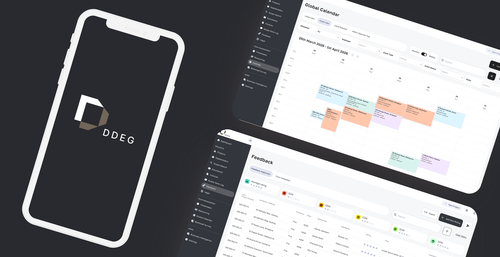
DDEG is a useful example because the answer wasn't obvious from the outside. Their subject-matter experts spent 3 weeks on each RFP response. Proposal software is a mature category, so on paper this looks like a buy decision.
The detail is in the inputs. Each response drew on three things: government data about the tender and the buyer, the experts' own subject-matter skills, and the organisation's past proposals. A typical proposal tool is built around a content library and templates, which covers the third input but not the other two.
That's the pattern to look for: a differentiating process whose inputs live in places packaged tools don't reach. The 3 weeks to 1 day result belongs to this case, not to every build.
What drives the three-year cost
Compare both options over three years, not one. Five drivers decide the real number, and none of them is the price on a website.

Licenses

Integration

Change

Maintenance

Exit
Honest numbers for each driver take a few conversations. Ask vendors for renewal terms in writing, and what customers typically spend connecting the product to systems like yours. Ask builders to describe year-two maintenance by role and hours, not as a single percentage.
Put each driver in both columns. The option that looked cheaper in year one often isn't by year three.
How we approach it

EB Pearls Approach
Studio builds only after buying is ruled out. What survives is usually a much thinner layer than the original scope: the integration, the data join or the workflow that is genuinely yours.
When we do build, we set out the five cost drivers for both options first. That way maintenance and exit are decided before launch, not discovered after it.
Check your own project
Frequently Asked Questions

Joseph Bridge, Business Development Manager at EB Pearls, excels in driving growth and forging strategic partnerships in the tech sector.
Read more Articles by this Author