
29 Sept 2026
Author
Yangjee Rai Shrestha


Most teams have one person they call when a critical part of the system misbehaves. That works well, right up until the week they're away. Below are six signs you can check in one team meeting, five habits that spread the knowledge, and three questions that tell you where to start.

Why we wrote this
The leave request that made everyone nervous
It's Thursday afternoon and the leave calendar updates. Mia, the engineer who built your billing integration, is off for three weeks from Monday. It's well earned, and she booked it months ago.
The short answer: Key-person risk in software is when one person holds knowledge your system can't run without. It's a continuity risk, not a people problem. You fix it by making knowledge a by-product of every change: documented as part of done, explained in every pull request, and held by at least two people.
Why it happens in good teams
Nobody plans for one person to know everything. It happens because that person is good, fast and trusted, so the hard problems keep going to them. Every shortcut made sense at the time.
That's why blame doesn't help. The person holding the knowledge is usually the one who has carried the system, often at the cost of their own leave.
Here's the honest part: fixing it slows delivery at first. Your most knowledgeable person will spend time explaining and reviewing instead of shipping. Expect a few slower sprints before the team gets faster and safer.
Six signs you have a one-person risk
Engineers call this the bus factor: how many people could disappear before work stops. Most systems show two or three of these signs. Treat each as a check to run, not a reason to panic.
|
Sign
|
What it is
|
What it looks like
|
What good looks like
|
|---|---|---|---|
|
One approver
|
Only one person can review or approve changes in an area
|
Billing pull requests wait until Mia is back
|
At least two people can approve each critical area
|
|
Unexplained integration
|
A connection to another system nobody else can explain end to end
|
"Don't touch that, it just works"
|
One page covering what it does, what it depends on and what breaks if it fails
|
|
Postponed leave
|
Someone keeps moving leave around the system
|
Holidays planned around releases; phone on at the beach
|
People take leave without a handover scramble
|
|
Stale docs
|
Documentation older than the code it describes
|
The setup guide mentions a server you retired last year
|
Docs change in the same pull request as the code
|
|
Slow onboarding
|
New engineers take months to make a safe change
|
A new hire shadows one person for a quarter
|
A new engineer ships a small, safe change in their first fortnight
|
|
Vendor lock-in
|
Only an outside vendor, current or former, can change it
|
Every fix needs a quote from the original builder
|
You hold the code, access and records to move support elsewhere
|
Five steps to spread the knowledge
Good software knowledge transfer isn't a handover meeting. It's five habits, in this order, and none needs a new tool.
1. Make documentation part of the definition of done
A change isn't finished until the docs it affects are updated.
-
What it looks like: a checklist item on every ticket, checked during review.
-
What good looks like: the docs and the code change in the same pull request.
2. Write pull requests that explain why
The code shows what changed. Only the description can say why.
-
What it looks like: the context, the decision made, and anything a reviewer should watch.
-
What good looks like: someone reading it in a year understands the change without asking.
3. Write runbooks for your top five incidents
Pick the five things most likely to wake someone at 2am. Google's SRE team found that recording best practices in a playbook gives roughly a 3x improvement in mean time to recover, compared with "winging it".
-
What it looks like: one short page per incident: symptoms, first checks, the fix, how to confirm it worked.
-
What good looks like: someone who has never seen the incident can follow it.
4. Keep decision records for the big choices
A decision record is a short note on the context, the decision and its consequences. AWS guidnace on decision records notes that without a recorded reason, the same topic gets discussed again and again.
-
What it looks like: one page per major choice, such as why billing runs overnight.
-
What good looks like: a new engineer can change an old decision knowing what it was protecting.
5. Put two people on every critical area
List your critical areas: billing, sign-in, and the integrations that move money or data. Name a primary and a backup for each.
-
What it looks like: the backup leads the next change while the primary reviews.
-
What good looks like: either person could handle a 2am incident alone.
When this isn't worth the effort
A small internal tool that changes twice a year may not justify all five steps. A one-page note on how to run and restore it is enough.
The test is simple. If this system stopped tonight and its expert was unreachable, would it cost you money, customers or a conversation with a regulator? If not, a lighter touch is fine.
How knowledge becomes a by-product
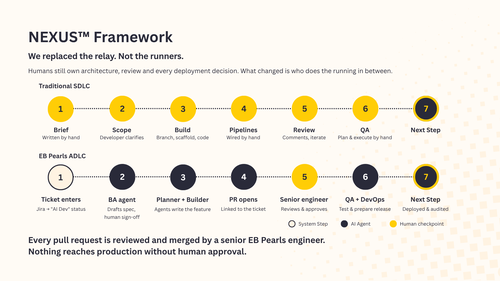
We build through our Agentic Development Lifecycle (ADLC).
Agents plan, build, test and prepare deployment, each with one job and narrow permissions (the planner can't commit code; the builder can't push to main). Senior engineers own architecture and review every pull request.
The last step, Learn, feeds what each change taught the team back into the standards and scaffolding the next change starts from. Nobody sits down to "do documentation". The record is created by doing the work, which is the same principle as the five steps above.
What drives the effort
This isn't free, and three things move the effort most:

How much is undocumented

How many critical areas you have

How available the key person is
How we approach it

NEXUS Sustain
Could someone else fix it at 2am?
Any "no" is a place to start. Begin with the critical area where the answer worries you most.
If you'd like a second view on where your system depends on one person, book a call. You'll leave with the two or three things worth fixing first.
Frequently Asked Questions

As a QA Manager, Yangjee is passionate about quality, automation, and security testing. She thrives on continuous learning to deliver exceptional software.
Read more Articles by this Author